How to Track Facebook Ads with Binom: Complete Guide 2026
Quick Answer: To track Facebook ads with Binom, create a Binom traffic source, map Meta macros like {{ad.id}}, {{adset.id}}, {{campaign.id}}, and {{placement}} into Binom tokens, build a clean campaign link, add a server to server postback, and verify clicks, costs, and conversions inside Binom reports.
Binom’s Facebook integration needs {{ad.id}} passed into Token 1 for cost sync, and Binom checks linked Facebook accounts every 30 minutes to refresh ad cost data.
For cleaner Meta campaign tracking, you can use a normal redirect link, Landing Page Pixel, or Click API tracking, based on how your funnel sends traffic to a lander or offer.
Binom LP Pixel allows no-redirect tracking from a landing page, while Click API can control click processing from a PHP landing page.
Compliance note: Use Binom for measurement, fraud checks, bot filtering, and attribution. Do not use any tracking setup to hide banned claims, unsafe offers, or policy-breaking pages from Meta review.
Why Binom Tracking Matters for Meta Ads
Meta Ads Manager gives platform data, but Binom gives click-level control across landers, offers, placements, devices, tokens, and payouts. Meta supports URL parameters for campaign analysis, including values for ad ID, ad set ID, campaign ID, placement, and site source.
Binom adds another layer by storing those values as tokens. Its traffic source token setup lets you pass data such as device, OS, ISP, country, publisher, and ad details from a traffic source into Binom reports.
Good Facebook ads tracking helps answer clear business questions.
Without clean URL parameter mapping, you may only see broad results. With Binom, each click can carry Meta values from ad click to conversion.

Scale Meta Campaigns Faster Using Binom Tracking
exclusive
Use Binom coupon code AFFMAVEN for 40% Off and unlock advanced Meta Ads tracking, placements, conversions, and ROI insights.
SAVE UP TO 40%
Pre-Setup Checklist to Track Facebook Ads with Binom
Before you create a campaign, prepare each item below.
| Item | Why it matters |
|---|---|
| Binom tracker domain | Your click URL and postback URL use your tracker domain. |
| Facebook ad account | Needed for traffic and optional cost sync with Binom. |
| Meta URL macros | Meta can pass ad, ad set, campaign, placement, and site source values. |
| Offer or affiliate network postback | Binom needs a click ID returned on conversion for attribution. |
| Landing page access | Needed for Landing Page Pixel or Click API tracking. |
| Meta Pixel or CAPI plan | Meta recommends using Conversions API with Pixel for shared event signals. |
Keep naming clean.
Use simple names like FB_US_Solar_LP1_Lead_May2026.
Short names reduce report clutter.
Step 1: Create Facebook Traffic Source in Binom

Open Binom.
Go to Traffic Sources.
Create a new source.
Use Facebook template if available.
Binom docs say you can load traffic source settings from a template, and Facebook setup needs a Traffic Source where Token 1 carries {{ad.id}}.
Name it something clear.
Example:
Facebook Meta Ads
Enable tokens.
Binom traffic source docs state that tokens pass values from source to tracker, and each token has a parameter, placeholder, and report name.
Use a practical token map.
| Binom token | URL parameter | Meta macro | Report name |
|---|---|---|---|
| Token 1 | ad_id | {{ad.id}} | Ad ID |
| Token 2 | adset_id | {{adset.id}} | Ad Set ID |
| Token 3 | campaign_id | {{campaign.id}} | Campaign ID |
| Token 4 | ad_name | {{ad.name}} | Ad Name |
| Token 5 | adset_name | {{adset.name}} | Ad Set Name |
| Token 6 | campaign_name | {{campaign.name}} | Campaign Name |
| Token 7 | placement | {{placement}} | Placement |
| Token 8 | site_source_name | {{site_source_name}} | Source |
Meta supports these URL macro values for ad, ad set, campaign, placement, and source tracking.
Binom docs also note that token values can be up to 512 characters.
Step 2: Build Meta URL Parameters
After traffic source tokens are set, create your tracking link.
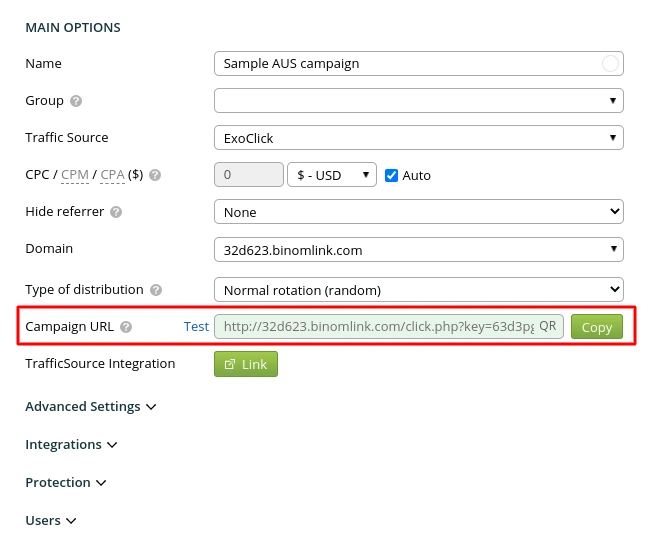
A standard Binom campaign link may look like:
https://track.example.com/click.php?key=CAMPAIGNKEYAdd Meta macros after it.
https://track.example.com/click.php?key=CAMPAIGNKEY&ad_id={{ad.id}}&adset_id={{adset.id}}&campaign_id={{campaign.id}}&ad_name={{ad.name}}&adset_name={{adset.name}}&campaign_name={{campaign.name}}&placement={{placement}}&site_source_name={{site_source_name}}Use the URL parameters field inside Meta ad setup when possible.
Meta says URL parameters can help measure ad effectiveness and can include static or macro-based values.
This gives Binom enough data for Meta Ads attribution.
It also helps you compare Instagram placements, Facebook feeds, Messenger, and Audience Network traffic using {{site_source_name}} and {{placement}}.
Keep URL names simple.
Avoid strange characters.
Use lowercase parameter names.
That keeps reports neat.
Step 3: Create Binom Campaign
Go to Campaigns.

Create a new campaign.
Pick your Facebook traffic source.
Add your landing page or direct offer path.
Select a campaign key that makes sense.
Example:
fb-solar-lead-us-lp1
Add landing page URL.
Add offer URL.
If you use an affiliate network, add Binom click ID to offer URL.
Binom postback docs state that {clickid} is used as a click ID token, and you should pass it to your network through a parameter such as sub1.
Example offer link:
https://offer.example.com/?sub1={clickid}&adid={t1}&placement={t7}Here:
This supports affiliate conversion tracking.
It also helps compare profit by ad ID and placement.
Step 4: Add Postback URL Setup
A postback sends conversion data back to Binom.
Binom docs explain that postback works by sending a click ID to an affiliate network, then receiving that same ID when conversion happens.
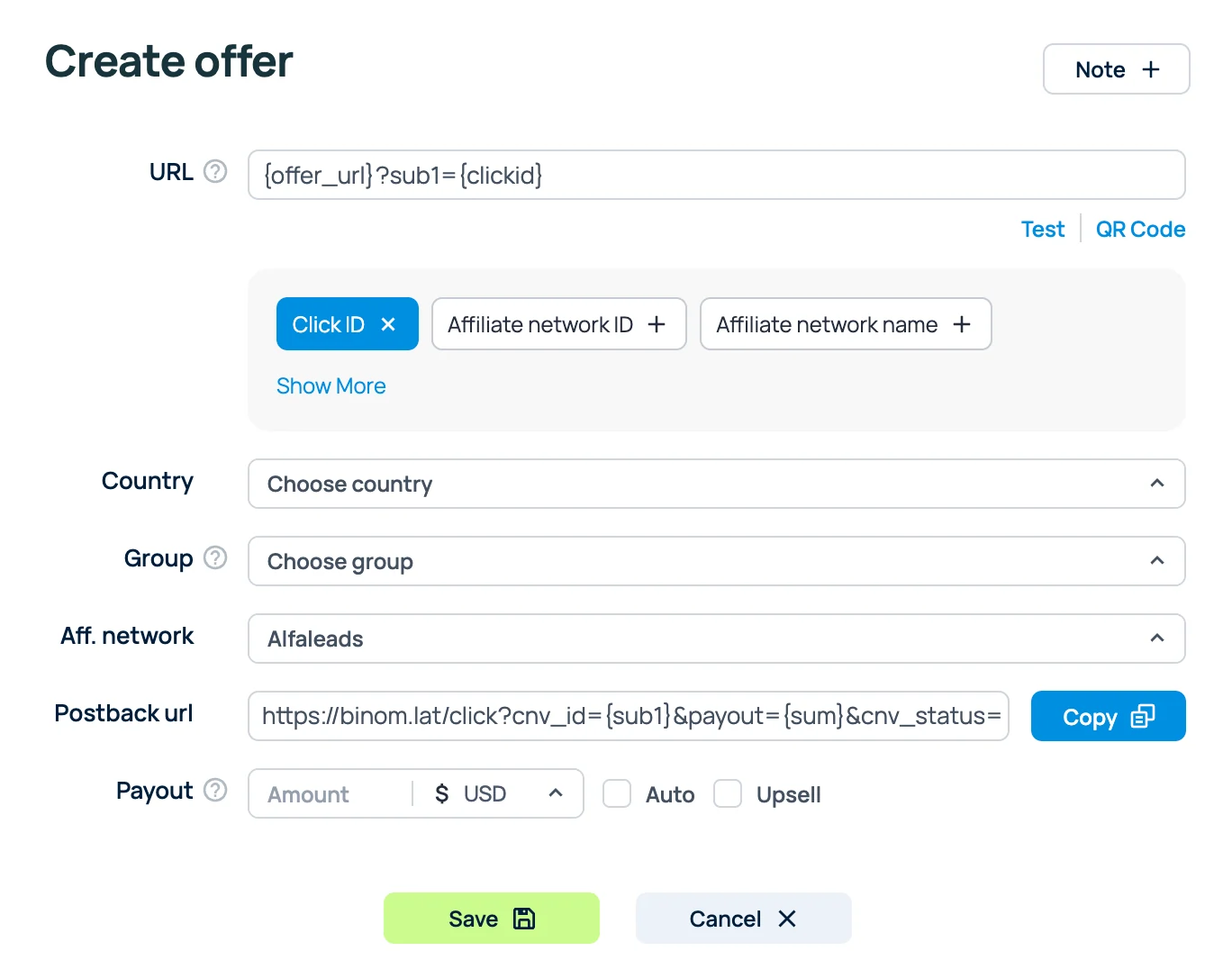
Find your Binom postback URL in Tracking Links.
A common structure looks like:
https://track.example.com/click.php?cnv_id={sub1}&payout={sum}&cnv_status={status}Your network may use different macros.
For example:
Set it inside your affiliate network or CRM.
Then test one click.
Binom should show click first.
After test conversion, Binom should match conversion to original click.
That is the core value of server to server postback.
Binom docs also state that payout, cnv_status, and cnv_currency can be used with postback URLs.
Step 5: Sync Meta Cost Data
Cost data matters.
Without cost, ROI is guesswork.
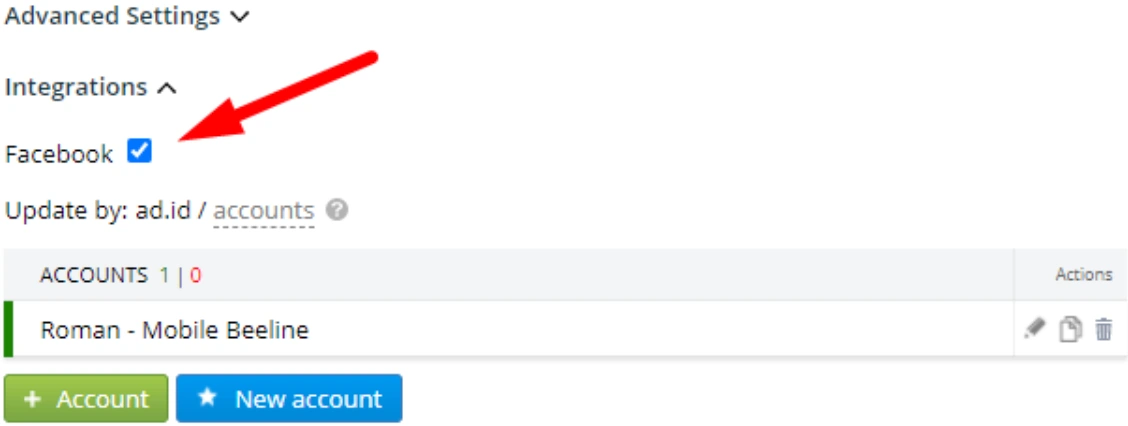
Binom’s Facebook integration uses a Facebook access token, links an account to campaign, and refreshes costs by {{ad.id}} every 30 minutes.
Binom docs say Facebook now requires a new token every 2 months.
To set it up:
- Open Meta for Developers.
- Create an app.
- Add Marketing API.
- Generate access tokens.
- Add a token inside Binom Facebook account settings.
- Connect that account inside campaign Integrations.
- Make sure Token 1 receives {{ad.id}}.
Binom docs also state that if more than one Facebook account connects to an access token, you should specify needed Facebook ID inside Binom.
This gives campaign cost tracking inside Binom.
It lets you review spend, revenue, profit, and ROI from one tracker view.
Step 6: Choose Tracking Method
Binom gives more than one way to track Meta traffic.
Pick method based on funnel type.
| Method | Best use case | Notes |
|---|---|---|
| Redirect link | Standard lander or offer flow | Fast setup with Binom campaign URL. |
| Landing Page Pixel | no redirect tracking for lander traffic | Binom says LP Pixel sends traffic directly to landing pages or own offers without redirect link. |
| Click API tracking | PHP landers with custom click logic | Binom says Click API is a low-level tool for click processing scenarios. |
Option A: Normal Redirect Link
Use a Binom campaign URL in Meta.
Meta click goes to Binom.
Binom records tokens.
Binom sends the user to lander or offer.
This is easiest.
It also gives clean reports.
Option B: Landing Page Pixel
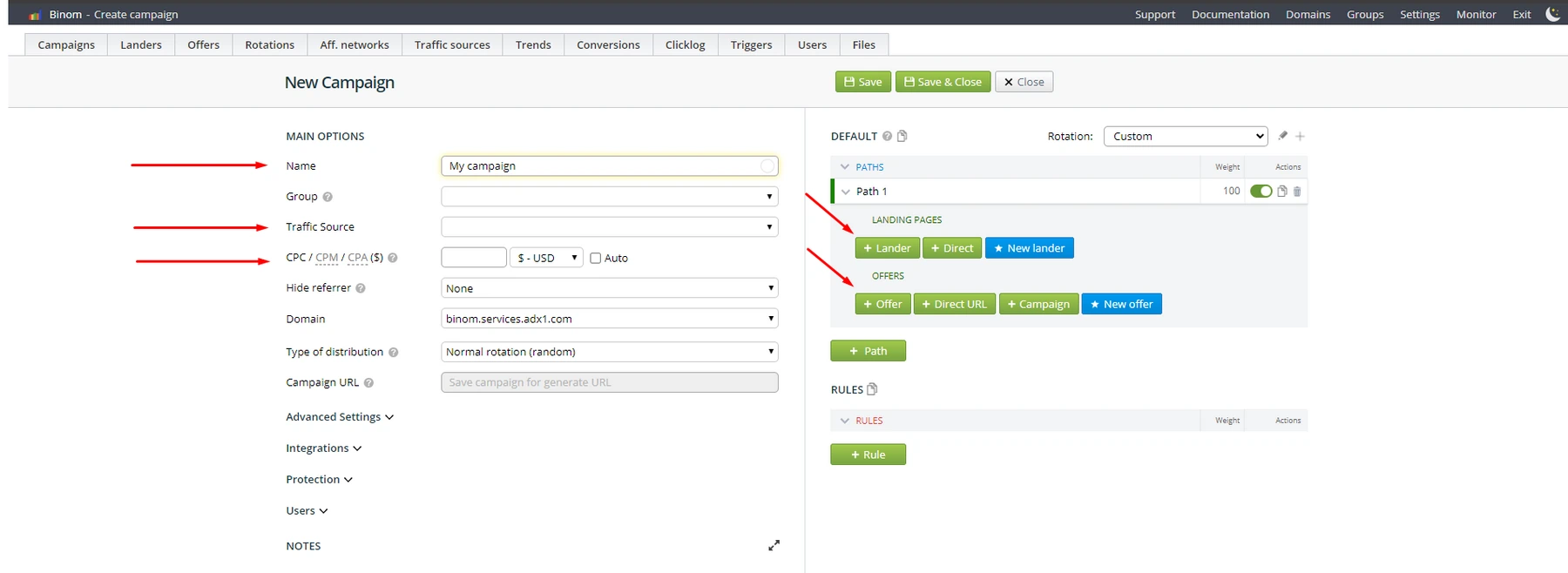
Use Landing Page Pixel if you want visitors to land directly on your page.
Binom says LP Pixel uses a script that you add to your landing page HTML head section.
This can reduce redirect friction.
It can also help when you want a brand domain in your Meta ad URL.
Basic flow:
Option C: Click API
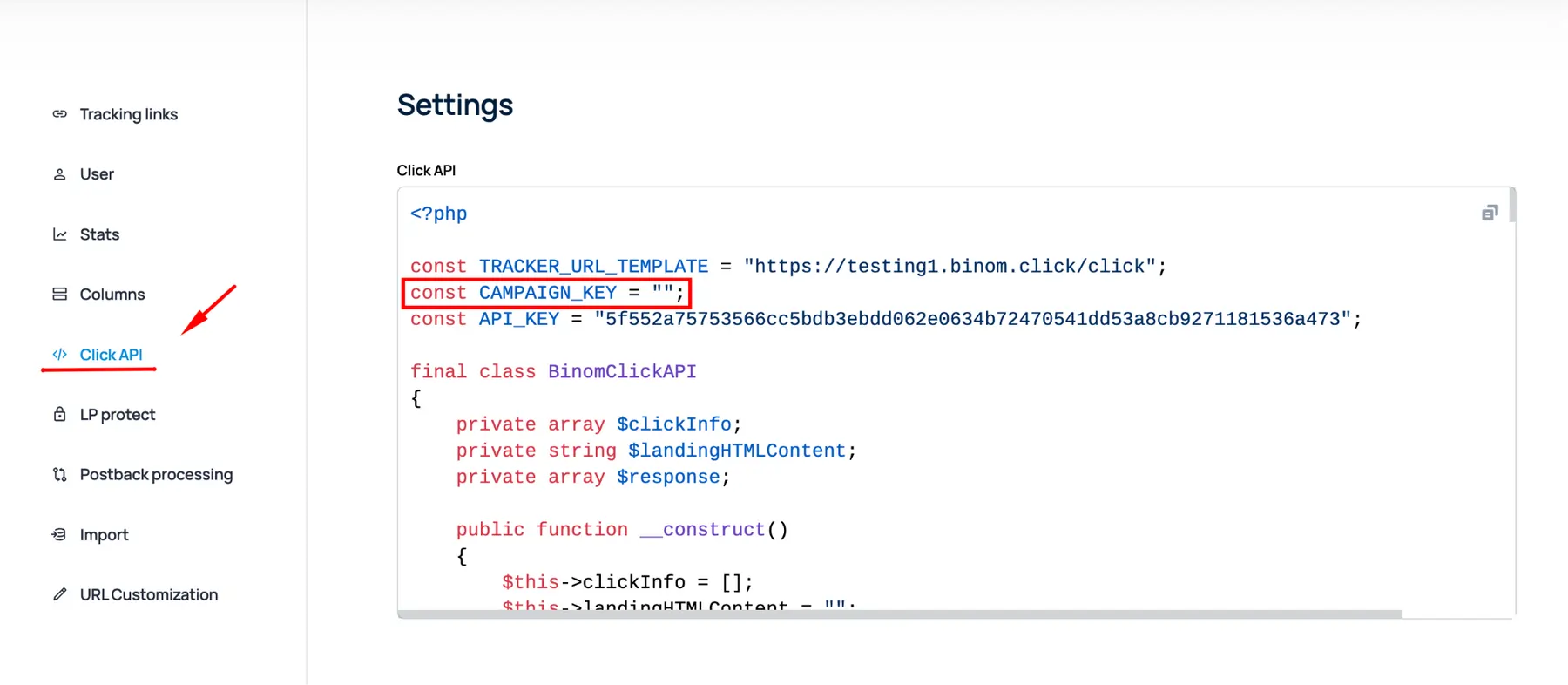
Use Click API tracking for PHP landers.
Binom docs say Click API code should be added near start of landing page code, saved as PHP, and linked to campaign key.
Click API is useful when you need full control over button clicks, offer URLs, and LP CTR.
Binom docs also show that Click API can get offer URL and send click data with sendBeacon on offer click.
Step 7: Meta Pixel and CAPI Alignment
Binom tracks ad click and affiliate conversion.
Meta Pixel tracks site actions for Meta’s ad system.
Meta Business Help says Meta Pixel tracks customer actions on your site and helps with campaign optimisation.
Meta also recommends using Conversions API with Pixel and sharing the same events through both tools.
Use event names with care.
Example:
If sending both browser and server events to Meta, use deduplication.
Meta has guidance for handling duplicate Pixel and Conversions API events.
Binom and Meta do different jobs.
Binom gives tracker-side attribution.
Meta events help ad delivery and audience learning.
Together, they improve conversion tracking setup.
Step 8: Binom Protect Usage With Compliance
Binom Protect can help spot bot traffic, crawlers, data centre visits, and poor quality clicks.
Binom Protect module analyses traffic and adds metrics to reports, and Research mode can inspect source quality without labelling clicks as bots or redirecting users.
Start with Research mode.
Watch data for 1 to 3 days.
Then decide if a filter is fair.
Public Binom Protect discussions list checks for bots, corporate networks, crawlers, data centres, VPN or abuse signals, TLS fingerprints, and Facebook-related review signals.
Use those checks for security and QA.
Do not use them to hide non-compliant offers.
Safe use cases include:
Do not create one page for reviewers and another page for real users if the goal is policy evasion.
Meta review should see a page that matches your ad, claims, and offer.
Step 9: White Page Routing Done Safely
A white page can be a safe fallback page.
Use it for bot traffic, broken URLs, unsupported GEOs, or QA traffic.
Do not use white page routing to mislead ad review.
A safe white page may include:
Keep it aligned with ad copy.
If an ad promotes a finance guide, fallback should not show unrelated news.
If an ad promotes a health product, fallback should not hide risky claims.
Binom Protect can mark clicks based on selected tags, and campaign rules can decide traffic paths.
A compliant rule might send data centre bots to a neutral information page.
A non-compliant rule would hide a banned offer from review.
Avoid that.
Step 10: Custom Tracking URL Format
A clean URL can look more natural and less technical.
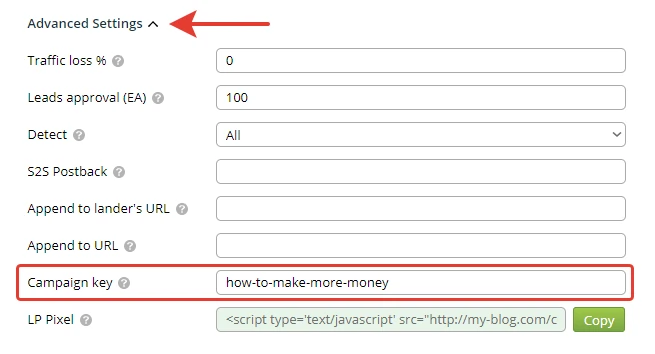
Binom URL Customization lets you rename service parameters and make links look neater.
Binom docs show an example where click.php changes to blog, key changes to post, and campaign key changes to an article-style slug.
Example before:
text
https://track.example.com/click.php?key=fb-solar-lead-us-lp1Example after:
text
https://track.example.com/blog.php?post=solar-guideUse custom tracking URL for clarity.
Do not use it to mask misleading content.
A good URL format helps trust.
It also keeps ad links tidy.
Binom docs also describe server setup that can support shortened URLs with 404 handling to click.php?type=404.
Use that only if your server config is correct.
Test before adding a link to Meta.
Step 11: Test Full Funnel
Do not send paid traffic before QA.
Use one test ad or direct test click.
Check each point.
Clicklog can show token values, which helps confirm ad ID passed into tracker.
Also test mobile.
Meta traffic is often mobile heavy.
Page speed matters.
Slow landers can hurt conversion rate.
Use the same domain setup for the final ad link.
Avoid switching domains after approval.
Keep privacy policy and terms reachable.
That helps user trust.
It also supports safer Meta review.
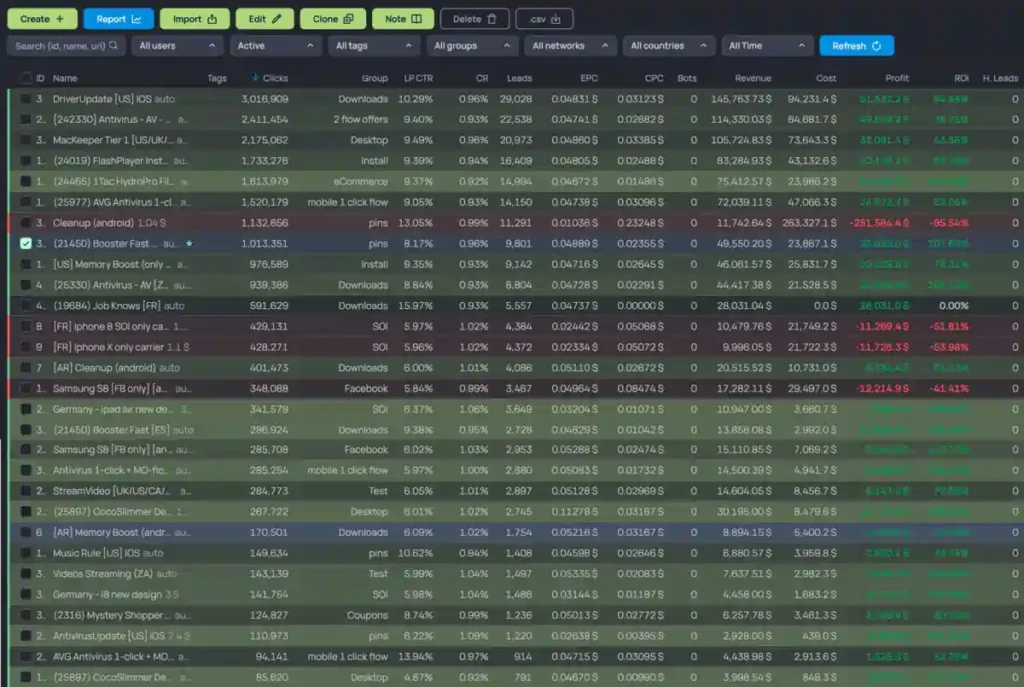
Step 12: Reporting View That Matters
After traffic starts, do not only watch campaign level.
Use token reports.
Key views:
Meta supports ad ID, ad set ID, campaign ID, placement, and site source values in URL macros.
Binom tokens store those values for reporting.
Review profit by ad ID.
Pause poor placements.
Scale ad IDs with good EPC.
Check LP CTR before blaming the offer.
Check offer CR before changing creative.
Use Meta campaign tracking with cost data.
When {{ad.id}} passes into Token 1, Binom can match cost by ad ID through Facebook integration.
That makes ROI cleaner.
Final Copy Checklist
Before publishing a campaign link, confirm all items below.
| Check | Pass standard |
|---|---|
| Token 1 | {{ad.id}} passes into Binom for cost sync. |
| Meta macros | Ad, ad set, campaign, placement, and source values are added. |
| Postback | Network returns Binom {clickid} on conversion. |
| Pixel/CAPI | Meta Pixel and CAPI plan uses correct events. |
| LP Pixel | Script sits in the page head if using LP Pixel. |
| Click API | PHP lander includes a campaign key if using Click API. |
| Protect | Research mode used before strict bot filtering. |
| URL format | Clean URL matches the final page and ad message. |
Good tracking is not just about clicks.
It links ad spend, source data, page behaviour, and conversion value.
With Binom, Facebook traffic can be measured at ad ID level, passed through landers, matched to postback events, and reviewed with cost and ROI in one place.