Binom Protect 2026: A Real Guide to Filtering Bot Clicks

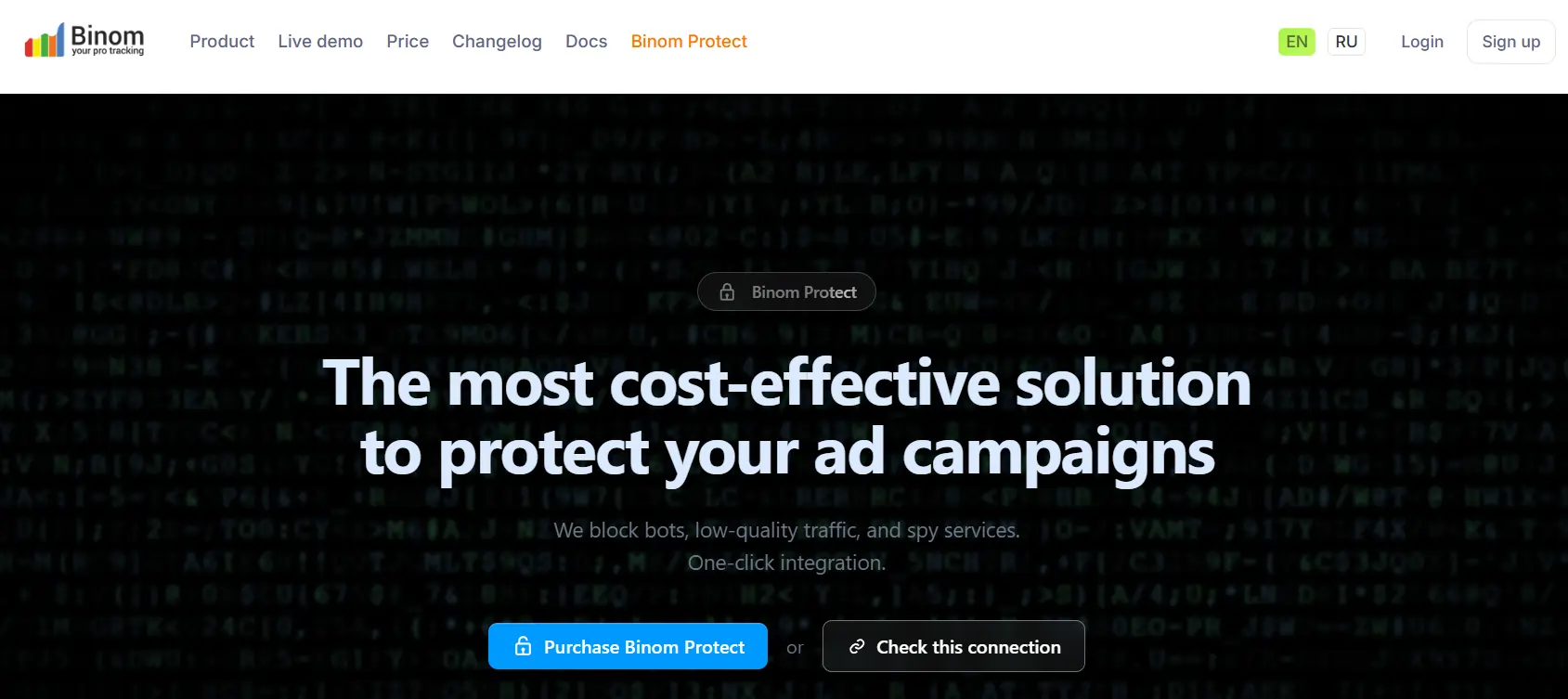
Quick Answer: Binom Protect helps affiliate marketers filter bot clicks, VPN traffic, datacentre visits, crawlers, fake mobile profiles, and risky JavaScript fingerprints before sending users to an offer page.
It works inside campaign settings, where you can enable detection modules, test with Research Mode, create Bot rules, and route suspicious clicks to a whitepage while real users continue to your money page.
Use promo code AFFINCOPROTECT for 30% OFF Binom Protect. Add it during checkout and apply it before activating your protection setup.
Binom Protect is useful for media buyers who need cleaner reports, better offer data, and safer affiliate campaign bot protection. It can work with other bot detection integrations, and a click can be marked as bot if any connected service flags it.
Why Binom Protect Matters For Affiliate Traffic
Bad traffic does not always look bad inside a normal tracker view. A click may carry a clean geo, normal device name, and valid browser string, yet still come from a proxy farm, data centre, crawler, or anti-detect browser.
Binom Protect adds extra signals to help separate buyers from bots. It can detect VPN or proxy traffic, data centre IP ranges, company networks, crawler activity, abusive IPs, and browser mismatch patterns.
For affiliates buying paid clicks, affiliate campaign bot filtering helps protect EPC, CR, ROI, postback quality, and source optimization. Cleaner data also helps when you split test landers, offers, angles, and traffic placements.
Binom Protect can work along with other bot detection integrations. If any enabled service marks a click as bot, Binom can count that click as bot traffic.
Use it as a control layer, not as a blind switch. Aggressive filters can block some real users, so each campaign needs testing before full filtering.

Binom Protect Reveals Hidden Bot Traffic Instantly
exclusive
Use Binom Protect coupon code AFFINCOPROTECT for 30% Off and block fake bot traffic hurting affiliate ROI.
SAVE UP TO 30%
Enable Binom Protect Inside Campaign Settings
Open Binom, go to your campaign, then find Binom Protect inside campaign settings. Binom docs state that Binom Protection can be enabled from Binom Protect section in campaign settings.
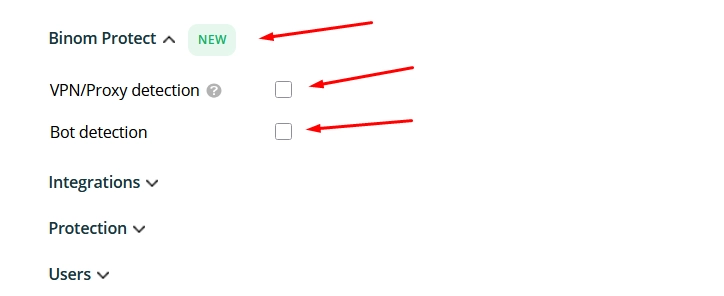
Turn on Binom Protect for one campaign first. Do not apply strict filters across all campaigns until you compare bot rates by geo, source, device, and browser.
Next, pick a preset or choose manual methods. Binom offers Light, Medium, and Paranoid presets for bot detection.
Use Binom Protect setup like a staged QA process:
Binom reports and Clicklog can show tags that explain why a click was treated as bot.
Choose Light, Medium, Or Paranoid Preset
Binom Protect presets help you start faster when you do not want manual method selection. Light gives protection against primitive bots and has lowest false positive risk.
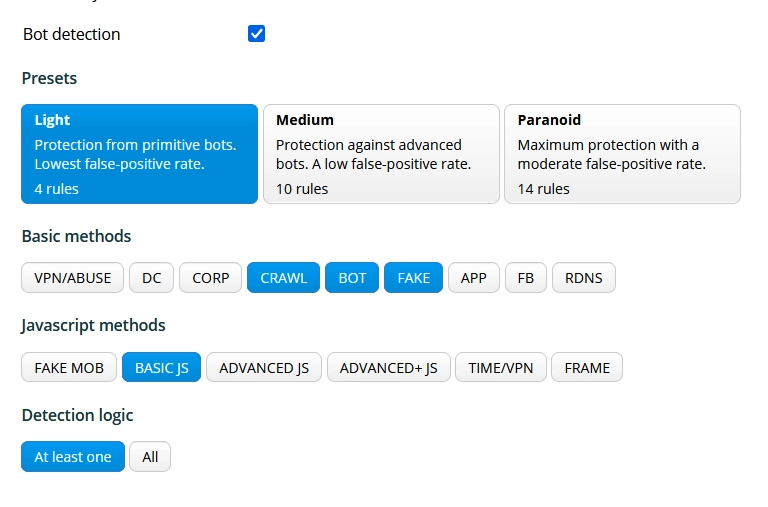
Medium targets more advanced bots and keeps false positive risk low.
Paranoid gives maximum protection, but Binom docs note a moderate false positive level.
| Preset | Best fit | Risk level | Suggested use |
|---|---|---|---|
| Light | New campaigns, broad traffic, early tests | Lowest false positive risk | Use for safe first pass |
| Medium | Paid traffic with clear bot noise | Low false positive risk | Use after Research Mode |
| Paranoid | High-risk sources, fake mobile spikes, spy activity | Moderate false positive risk | Use only after tag review |
A good default path is Light first, Medium after data review, Paranoid only for risky placements. For high-value campaigns, test preset impact against CR and approval quality before scaling.
Do not treat preset names as strict rules. A Tier 1 mobile campaign may need different checks from a push campaign in a high-abuse geo.
Basic Detection Methods Explained
Basic methods inspect request, IP, network, and browser-level signals. They are useful when you want fast Binom bot detection methods without adding extra JavaScript checks.
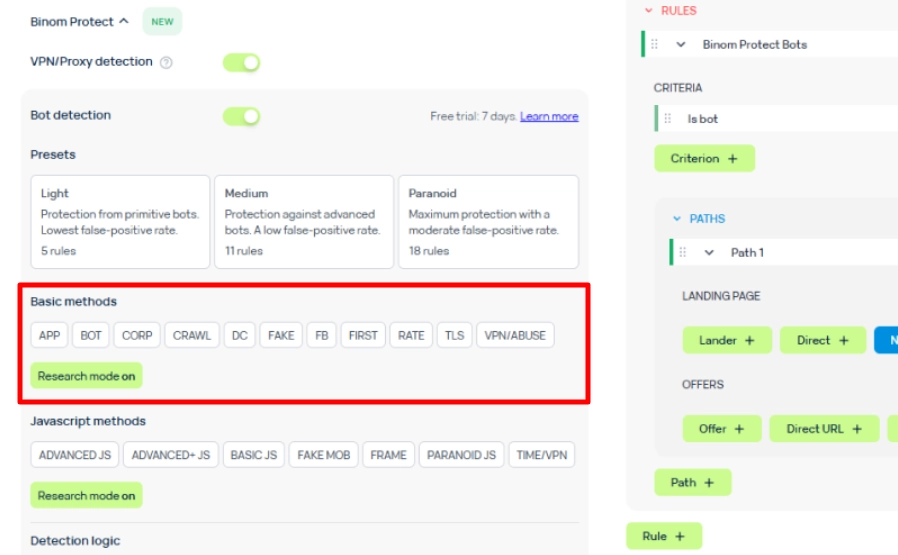
BOT detects simple bots and known automated crawlers through HTTP request analysis, and Binom docs say it filters about 1 to 2% of traffic.
CORP checks IPs against organisation databases, such as education, government, banking, finance, and business networks, but Binom warns it may include real traffic.
CRAWL checks IPs against known crawler databases and is useful when you do not want a link or site indexed.
DC checks known hosting IP ranges, including hosters and services linked with automated scans, proxy servers, and unwanted traffic.
VPN/ABUSE checks IPs tied to malicious activity, TOR, proxies, VPNs, spam, DDoS, fraud, or hacking signals.
TLS detects browser mismatch based on TLS fingerprinting in Binom Protection V2 docs.
For most campaigns, start with BOT and VPN/ABUSE. Add DC when data centre clicks are clearly hurting results.
Be careful with CORP. Some real users browse from the office, bank, school, or public networks.
JavaScript Detection For Fingerprints
JavaScript methods add browser-side checks. Binom notes that JavaScript methods add a redirect, so use caution if your traffic is sensitive to delays or redirects.
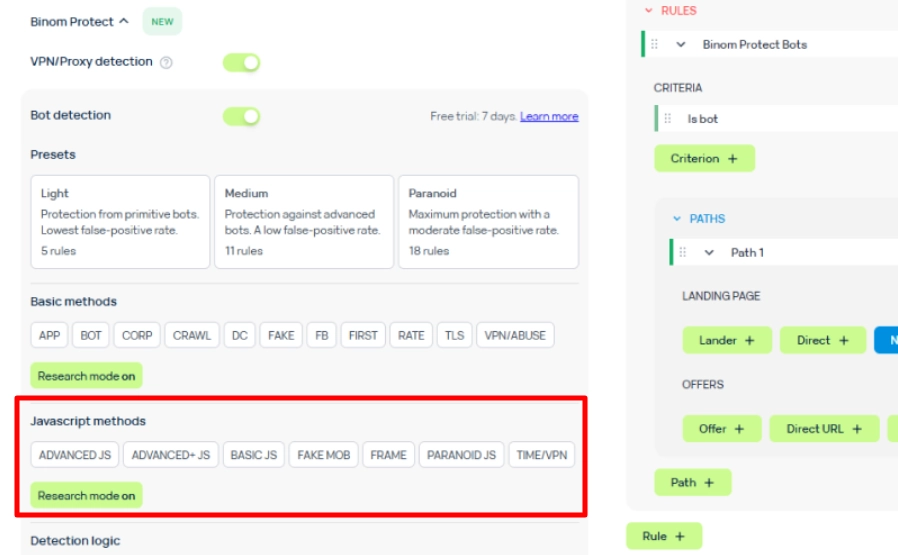
BASIC JS checks mismatch between claimed and real browser fingerprints. Binom says it can help with Google Safe Browsing risk in some cases and filters around 3 to 5% on average.
ADVANCED JS uses device JS fingerprinting to detect spy services, Google Safe Browsing checks, anti-detect profiles on smartphones, changed hardware specs, automation patterns, and opened Chrome Dev Tools.
FAKE MOB targets Android and iOS device spoofing, fake Apple devices, anti-detect mobile profiles, spy tools, antivirus crawlers, and browser or hardware manipulation.
ADVANCED+ JS uses deeper JS and network-layer fingerprinting and is recommended by Binom for high-risk flows.
Paranoid JS applies strict capability and sensor checks, and Binom recommends it only for high-risk flows or escalation after Advanced+.
Use JavaScript bot detection when HTTP and IP checks are not enough. It is ideal for fake mobile patterns, anti-detect browsers, and spy traffic.
Basic Vs JavaScript Filters
Basic and JavaScript filters should work as a pair. Basic checks are lighter because they focus on request and network data, while JavaScript checks inspect browser behaviour and fingerprint signals.
| Filter type | Checks | Good for | Caution |
|---|---|---|---|
| Basic | IP, request, crawler, VPN, TLS, company, data centre | Fast first layer | May miss browser spoofing |
| JavaScript | Fingerprint, device traits, browser mismatch, fake mobile signals | Advanced fraud signs | Adds redirect |
For VPN proxy detection, Basic methods are usually the first choice. VPN/ABUSE checks TOR, proxies, VPNs, and abusive IP signals.
For fake mobile bot detection, JavaScript methods matter more. FAKE MOB is aimed at Android and iOS checks for fake or altered mobile profiles.
A balanced setup for paid social or push traffic could use BOT, VPN/ABUSE, TLS, BASIC JS, and ADVANCED JS. Add FAKE MOB only when mobile spoofing is visible in reports.
Use Research Mode Before Blocking
Research Mode is the safest way to audit traffic before active filtering. Binom docs say Basic Research Mode checks incoming traffic against all Basic methods, but data goes to reports and clicks are not marked as bots from those checks.
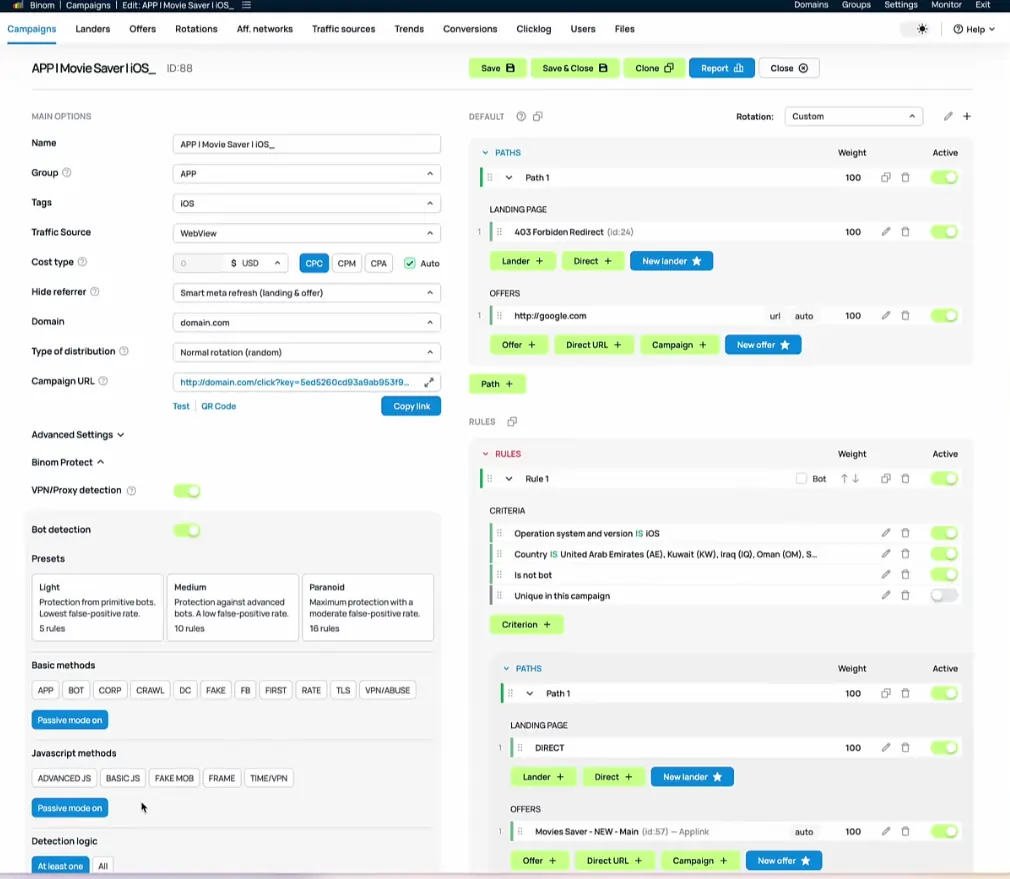
JavaScript Research Mode works in the same way for JS methods. It checks traffic against all JavaScript methods but does not mark clicks as bots unless specific JS methods are enabled.
Use Research Mode testing for at least one full traffic cycle. If your source sends the most volume during certain hours, cover those hours before changing rules.
Check these fields during test:
A bot tag alone is not always enough. Compare it against spend, conversions, rejected leads, and offer feedback.
Build Bot Rules And Whitepage Paths
Binom Protect marks clicks as bot based on selected tags, but you still need a Bot rule to send those clicks to a bot path. Binom docs clearly state that a Bot rule is needed to send marked clicks to a specific bot Path.
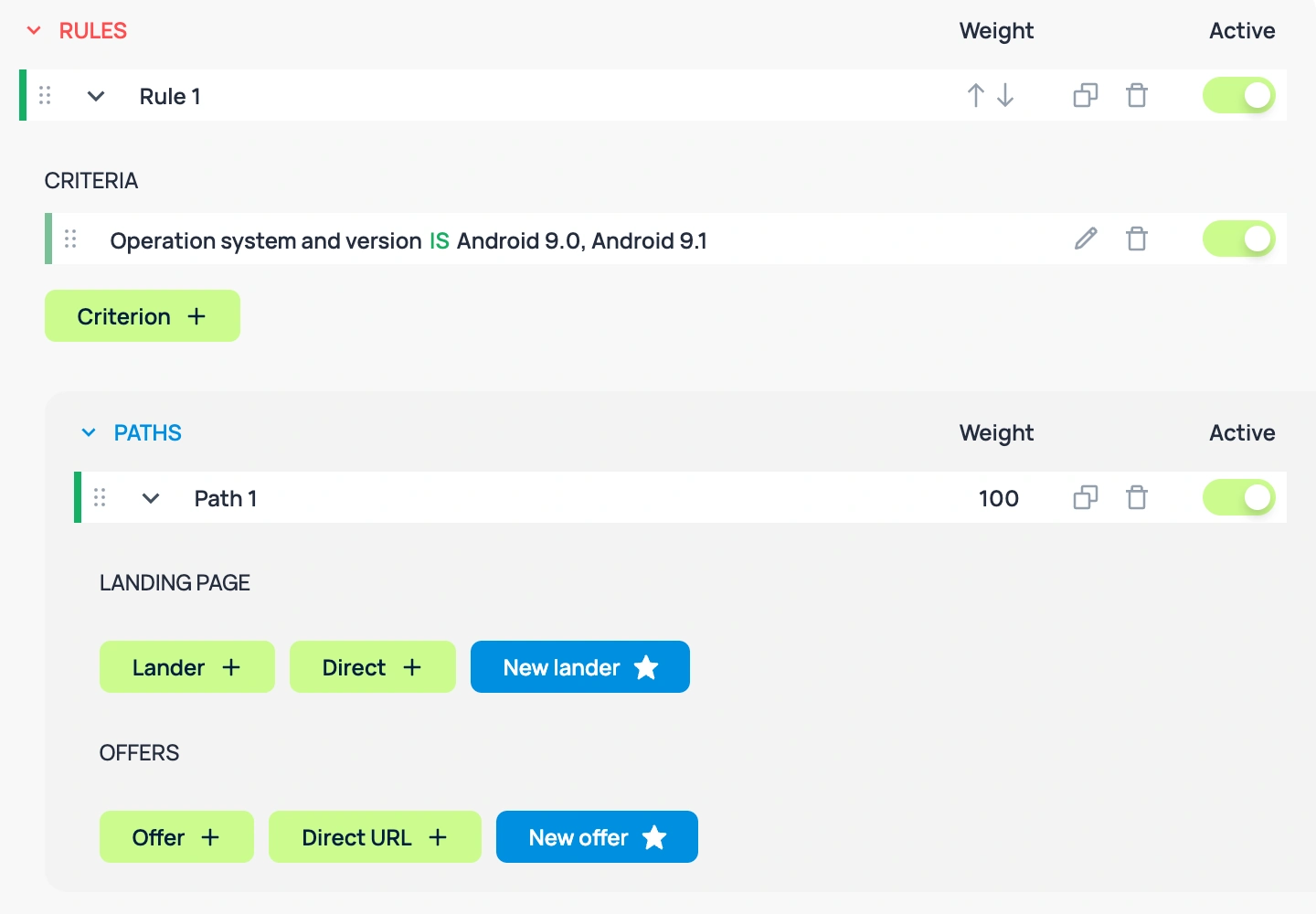
Create a safe whitepage path first. A whitepage can be a clean article, neutral product page, compliance page, or source-approved landing page.
Next, create one rule with the condition Is bot equals Bot. Send that rule to your whitepage or safe path.
Create another rule with Is bot equals NOT bot. Send clean users to your main lander, pre-lander, or offer flow.
For whitepage routing rules, keep naming clear:
| Rule name | Condition | Destination |
|---|---|---|
| Bot Whitepage | Is bot = Bot | Whitepage or safe path |
| Clean Traffic | Is bot = NOT bot | Main lander or offer path |
| Default Safety | No match | Neutral fallback page |
Binom JS Protection can show one landing page to bots and moderators, while target traffic can load or redirect to another landing page based on Bot or NOT bot rule response.
Use whitepage routing for compliance and fraud control. Do not use it to break ad platform rules or mislead partners.
Add JS Protection Script If Needed
JS Protection helps when site builders do not allow PHP scripts in landing page code. Binom docs say JS Protection can send traffic data to Binom and change page content based on bot status.
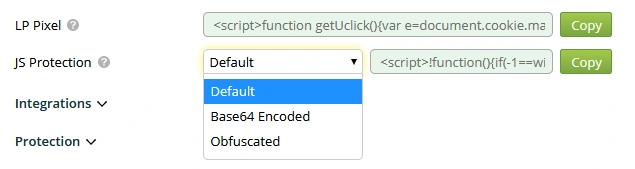
Binom instructs users to insert JS Protection script into the head of the landing page. It also says script is unique for each campaign and can be found in campaign settings under JS Protection field.
Setup flow:
Binom docs mention three JS Protection hiding choices: Default, Base64 Encoded, and Obfuscated.
Use obfuscation only when you need cleaner source code exposure control. Keep one plain test copy for debugging.
Detection Logic: At Least One Vs All
Binom Protection offers two detection logic choices. At least one marks a click as bot if it matches at least one enabled Basic or JS method, while All marks a click as bot only if it matches all enabled methods.
At least one is stricter. It blocks faster, but false positives can rise if you enable harsh filters.
All is safer for mixed traffic. It needs stronger proof before bot marking.
For many affiliate campaigns, at least one works well with conservative methods like BOT and VPN/ABUSE. Use All if you combine noisy methods such as CORP, DC, and FAKE MOB.
Track impact after each change. If conversions drop but bot tags spike, compare Clicklog samples before deciding.
Testing Click Flow Before Live Spend
Before paid volume starts, test both bot and clean paths. Binom docs allow adding is_bot=1 to a campaign link to force a click as bot, or is_bot=0 to force it as not bot for testing.
Use forced bot parameter to confirm whitepage path. Use forced non-bot parameter to confirm the main lander path.
Example test plan:
Binom has a setting under Settings > Stats called Do not assign cost for bot clicks, and docs note it affects only new bot clicks after activation.
Practical Filter Sets For Affiliate Campaigns
Start simple. Too many filters at once can hide the real cause of traffic loss.
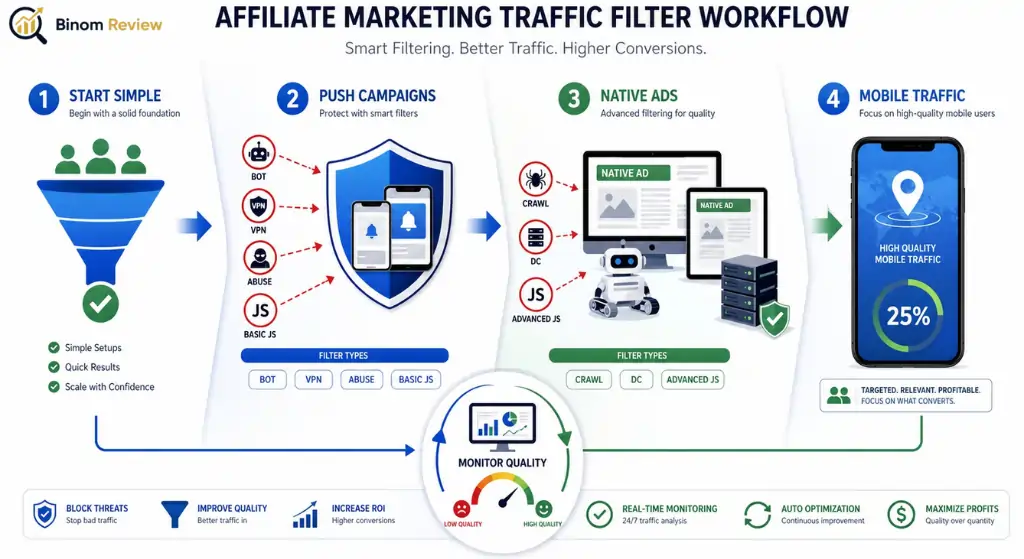
For a new push campaign, use Research Mode plus BOT, VPN/ABUSE, and BASIC JS after review. BOT catches simple automated traffic, while VPN/ABUSE checks malicious IP history, TOR, VPNs, and proxies.
For native ads, test BOT, CRAWL, DC, and ADVANCED JS. CRAWL helps with known search robots, while DC catches known hosting ranges.
For mobile-heavy sources, test ADVANCED JS and FAKE MOB carefully. FAKE MOB can filter around 25% of traffic and is geo-specific, so enable it only after report review.
For Facebook campaigns, FB method detects Facebook bots based on HTTP headers and IP addresses, and Binom recommends it by default if you work with Facebook.
Use traffic quality monitoring as an ongoing habit. Check bot share after source changes, new creatives, new placements, or geo expansion.
Final Verdict
Binom Protect turns bot filtering from a guessing game into a measurable system. Pick a preset, validate inside Research Mode, layer custom rules, and route flagged clicks to a whitepage.
Add the JavaScript script for stronger fingerprint signals and watch block reports each week.
Affiliate campaigns get cleaner data, healthier network relationships, and better return on ad spend.
Apply code AFFINCOPROTECT at checkout to start with a 30% discount on month one.